
What’s the Best Way to Improve Accuracy in Door and Window Cutting?
Accuracy is critical when cutting door and window components such as frames, sashes, muntins, and other parts that need to fit together correctly. A small measurement error may not look serious on one piece, but across hundreds of cuts, it can turn into poor assembly, rework, wasted material, and production delays. That’s why consistent cutting accuracy matters just as much as cutting speed.
Manual measuring and feeding can make that consistency difficult to maintain. Operators have to measure, mark, position, check, and repeat the same steps throughout the day. Fatigue and small positioning mistakes can eventually affect production. Automated measuring, positioning, feeding, and optimizing systems provide a more repeatable approach. For manufacturers looking at chop saw measuring system technology, this can be a practical way to improve accuracy without simply adding more labor.
Why Accuracy Matters in Door and Window Cutting
Door and window components have to fit together properly during assembly. A frame member that is slightly too long or short can create gaps, alignment problems, or extra work during installation.
The issue becomes bigger in high-volume production. A single incorrect cut may be easy to catch, but repeated small errors can create a pile of rejected parts before anyone notices the pattern.
Manual measuring also takes time. Operators need to read a cut list, measure the material, mark the location, and position the piece before making the cut. When the same process is repeated hundreds of times, there are simply more opportunities for something to go wrong.
Consistent positioning helps reduce that variation. Instead of relying on the operator to recreate the same measurement every time, automated equipment can return the material to a programmed position with much less guesswork.
Common Causes of Cutting Errors in Door and Window Manufacturing
Cutting errors do not always come from the saw itself. In many cases, the problem starts earlier in the workflow.
Tape-measure errors are common, especially when operators are moving quickly between different measurements. A wrong number transferred from a cut list can produce the wrong part before the mistake is even noticed.
Manual saw stops can create another problem. If a stop is not reset correctly between jobs, the next batch may be cut to the wrong length. Material can also shift during positioning or feeding if it is not properly secured.
Operator fatigue plays a role, too. Repeating the same measuring and positioning steps for hours is not exactly exciting work. Different operators may also use slightly different methods, which can create variation from one shift to another.
These small issues may not seem expensive individually. Multiply them across a large production run, and the cost becomes much easier to see.
How a Chop Saw Measuring System Improves Accuracy
A chop saw measuring system helps automate the measurement and positioning process before the cut is made. Instead of measuring every piece with a tape measure and manually setting a stop, the operator can use programmed dimensions to position material consistently.
The main benefit is repeatability. Once a measurement is entered, the system can position the material at the same location for the next cut. That reduces the amount of manual measuring and checking required throughout a production run.
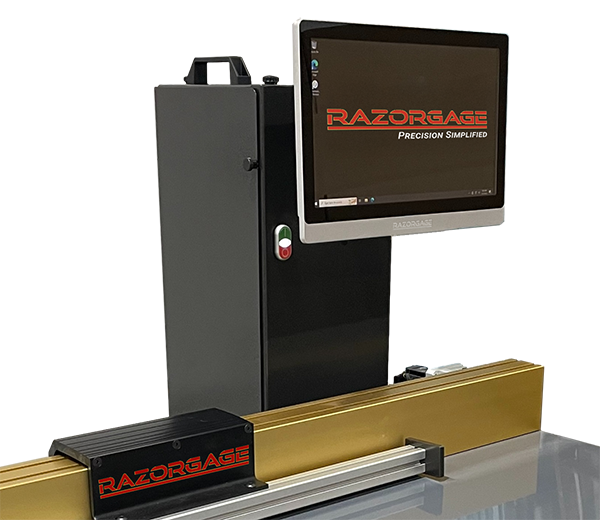
RazorGage’s RG3 is designed for this type of automated material positioning. It can work as a programmable saw stop and positioner, helping operators move from one programmed measurement to the next without repeatedly measuring by hand.
For door and window manufacturers, that can make a real difference when the same dimensions are used across large quantities of parts.
The goal is not to remove the operator from the process completely. It is to take repetitive measurement and positioning work out of the operator’s hands where automation can do it more consistently.
Chop Saw Measuring Equipment vs. Manual Measurement
Traditional measuring methods are familiar for a reason. A tape measure, pencil, and manual stop can get the job done. For occasional cutting or small batches, that may be all a shop needs.
The situation changes as production volume increases.
Manual measurement requires repeated marking, checking, and positioning. Each step takes time, and each step gives human error another opportunity to enter the process.
Automated chop saw measuring equipment reduces those repeated steps. The operator can work from programmed measurements instead of starting from zero on every piece. That can shorten setup time and make it easier to maintain consistent dimensions throughout a run.
It also helps when several operators use the same equipment. Rather than depending entirely on each person’s measuring technique, the positioning system provides a common reference point.
That consistency becomes especially valuable when a shop is producing large quantities of similar door and window components.
Using a Chop Saw Positioning System for Repeatable Cuts
Measurement tells the system what dimension is needed. Positioning makes sure the material actually gets there.
A chop saw positioning system places material at the required cutting location, helping maintain the same position from one part to the next. This is particularly useful for repetitive components where even small variations can affect assembly.
The RG3 can function as an automatic pusher or saw measuring stop, depending on the application. Automated positioning reduces the need for operators to manually move material to every measurement.
RazorGage positioning technology can also support different shop equipment, including chop saws, upcut saws, and downcut saws. The important point is that the positioning equipment and the saw are not the same thing. The positioner handles material location, while the saw performs the cut.
That distinction matters when building an automated cutting workflow. You want each part of the system doing the job it was designed to do.
The Benefits of Automating Material Feeding
Material feeding is another area where repetitive manual work can slow production. Operators may spend a large part of the day moving stock into position, waiting for the next measurement, and repeating the same motion.
The benefits of automating material feeding become easier to see in this type of environment.
An automated pusher can move material into position consistently while allowing the operator to focus on the cutting process and handling finished parts. It can also reduce unnecessary manual handling and help maintain a steady production rhythm.
RazorGage’s APS Auto Pusher System is an automated optimizing saw system designed for automated material feeding and cutting. Instead of relying entirely on an operator to push each piece to the required location, the system can handle repetitive feeding and cutting tasks.
That does not mean automation is always the answer for every shop. Smaller operations with low production volumes may not need it. But when repetitive cutting takes up a significant amount of labor time, automated feeding can become a practical way to increase throughput without simply adding another operator.
How Automated Cutting Helps Reduce Manufacturing Waste
Accuracy and material waste are closely connected.
When a part is cut incorrectly, the material may no longer be usable for its intended purpose. The mistake can turn a good piece of stock into scrap. If that happens repeatedly, the cost adds up quickly.
Accurate positioning reduces the risk of cutting components to the wrong dimensions. But optimization can go one step further.
RazorOptimal is designed to optimize cutting based on the available material. The system can scan material for defects and optimize cuts around defect-free areas. This helps manufacturers make better use of available stock instead of automatically treating an entire board or piece of material as unusable.
That can support waste reduction in manufacturing by improving material utilization and reducing unnecessary scrap.
For door and window manufacturers working with expensive or high-volume materials, better utilization can have a direct impact on production costs.
Choosing the Right Saw for Accurate Door and Window Cutting
Accurate positioning is important, but the cutting equipment still matters. A good measurement system cannot fix every problem caused by poor cutting performance.
The RazorGage upcut saw provides controlled cutting for applications where repeatability and clean results matter. The Cyclone 600 can cut wood and other materials up to 20 inches wide, making it suitable for a range of larger material applications.
The Cyclone 600 also has a specific design that should not be generalized to every saw. Its industrial design incorporates a direct-drive motor that glides on machine tool-grade, recirculating ball linear bearings, providing ultimate durability.
This direct-drive approach helps reduce vibration during operation. Other saws use swing-arm motion, which can introduce vibration and wear over time.
Material holding also matters. RazorGage systems use clamps, manual or automatic, to hold the material securely during cutting. Clean, accurate cuts come from controlled material holding and smooth cutting motion, not from assuming that the blade itself pushes material against the fence.
When the cut is accurate and repeatable, downstream assembly becomes easier. Parts are less likely to need adjustment simply because of inconsistent cutting.
Beyond Straight Cuts: Improving Angle-Cutting Accuracy
Not every door or window component requires a straight cut. Angled and mitered parts can introduce another layer of complexity.
Manual angle adjustments require the operator to measure, set, check, and repeat the angle. Like manual length measurement, that process creates opportunities for variation.
The RazorGage AngleMaster addresses this challenge by supporting automatic and semi-automatic angle cutting. The right mode depends on the job.
For repetitive 90-degree cuts, the AngleMaster Auto90 package can sort parts into groups and run groups containing only 90-degree cuts in automatic mode. When a group contains different angles, the system switches to semi-automatic mode. This gives the operator more control and helps clear angle drops that could otherwise cause problems in an automatic pusher system.
The Auto90 package is not standard with AngleMaster saw systems. It is an option for shops that need fully automatic 90-degree cutting.
Combining accurate angle positioning with automated measurement and feeding can help manufacturers maintain better consistency across more complicated parts.
A Complete Accuracy-Focused Cutting Workflow
The best results usually come from looking at the entire cutting process instead of relying on one machine to solve every problem.
A typical accuracy-focused workflow can include:
Measure: A chop saw measuring system helps establish repeatable material dimensions.
Position: A chop saw positioning system moves material to the correct cutting location.
Feed: The APS Auto Pusher System handles repetitive material movement and cutting.
Cut: The Cyclone 600 Upcut Saw provides controlled cutting for the material.
Optimize: RazorOptimal helps determine efficient cutting patterns and work around material defects.
Verify: The RazorGage Caliper Measuring Table can be used to measure finished components and check results.
These technologies serve different roles. An optimizing saw system can bring several of them together, but it is important not to treat every individual product as though it includes every feature.
For example, programmable saw stops, AutoList optimization software, and label printing are associated with RG3 positioning and optimizing system configurations. They are not features of the saw itself.
That distinction helps manufacturers choose equipment based on the actual production problem they need to solve.
Conclusion
Door and window manufacturers need more than fast cutting. They need repeatable accuracy across every production run.
Manual measuring and positioning can work, but as production volume increases, repetitive tasks create more opportunities for errors, wasted material, and rework. Automated measuring, positioning, feeding, and optimization can reduce that variation and create a more consistent workflow.
RazorGage offers equipment for different stages of the cutting process, from RG3 positioning and the APS automated optimizing saw system to the Cyclone 600 Upcut Saw, RazorOptimal optimization, AngleMaster angle cutting, and finished-part measurement.
The right combination depends on the shop, the materials, and the production requirements. But when accuracy, efficiency, and material use all matter, automation can provide a practical path toward a more controlled cutting process.
FAQs
What is a chop saw measuring system?
A chop saw measuring system automates material measurement and positioning so operators can repeat programmed dimensions with less manual measuring.
How does automated positioning reduce errors?
It reduces repeated measuring and manual stop adjustments, helping place material at consistent cutting positions across production runs.
Can automated feeding reduce material waste?
Yes. Consistent feeding and positioning can reduce incorrect cuts, while optimization systems can improve how available material is used.
What equipment does RazorGage offer?
RazorGage offers positioning, feeding, saw, optimization, angle-cutting, and measurement solutions that can be configured for different production workflows.
Improve Accuracy With the Right Cutting Technology
Better accuracy does not always mean replacing your entire production process. The right chop saw positioning system, automated feeding equipment, measurement technology, and saw can address the areas where your current workflow loses time or material.
Explore RazorGage’s automated measuring, positioning, feeding, and saw solutions to build a more consistent cutting workflow for your shop.
Visit RazorGage to learn more: https://razorgage.com