
How Can Commercial Glass Shops Achieve More Consistent Angled Cuts?
Getting an angled cut right once is easy. The hard part is getting it right on every piece across an entire production run. In commercial manufacturing, a small measurement mistake doesn’t stay small once parts start going together. One bad cut means lost material, rework, and delays.
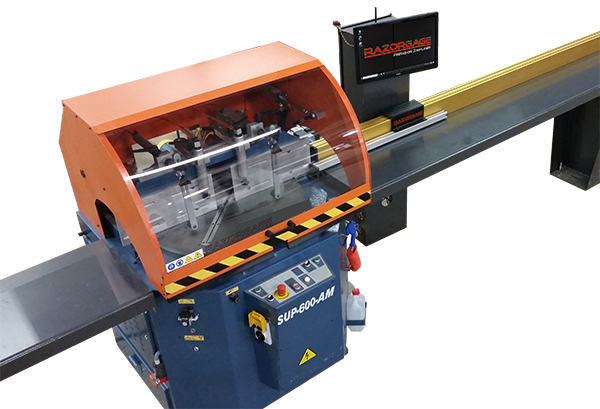
Manual setups get harder when operators change angles many times a day. It takes time, and mistakes happen even in experienced hands. The RazorGage AngleMaster takes a different path: it runs in both automatic and semi-automatic modes, giving the shop flexibility to match the job in front of it.
Where Commercial Angled Cutting Usually Goes Wrong
Angle cutting doesn’t leave much room for guesswork. A part that doesn’t match spec won’t fit during assembly, and when several parts have to match, one bad cut throws off the whole job.
Manual adjustments are usually the culprit. The operator measures the material, sets the angle, checks the position, and cuts. Then the next job needs a different angle, and the whole routine restarts. Do that all shift, and the odds of a mistake climb fast.
Consistency between operators matters too. One person has a reliable setup routine; another tackles the same task a bit differently. Those small differences show up in the finished parts, especially on big batches.
And then there’s the cost of getting it wrong: recutting a piece, fixing the mistake, or holding up the next stage of production.
The real problem isn’t making one accurate cut. It’s keeping that accuracy without turning every setup into a drawn-out process.
Why Positioning Makes or Breaks the Cut
Positioning is the first step to a good cut. No saw can save the part if the material isn’t positioned at the correct measurement.
This is why accurate placement of material matters so much. In shops with repeat orders, reliable stops and stored settings let the operator return to a saved setting without redoing the setup.
It also helps when several operators run the same job. The team works from one consistent setup instead of each person’s measuring habits.
Positioning systems still need regular maintenance, and operators still need to follow procedure. What they remove is the guesswork that makes consistent production so frustrating.
How the RazorGage AngleMaster Handles Different Jobs
Not every run needs the same level of automation. Plenty of jobs are straightforward 90-degree cuts; others involve several angles. Treating both the same way isn’t always practical.
The RazorGage AngleMaster handles this by supporting automatic and semi-automatic operation. The logic is simple: automate where it helps, keep the operator in the loop when the job needs flexibility.
Automatic Operation for 90-Degree Cuts
When a run calls for all 90-degree cuts, automatic operation can save real time. Operators don’t have to manage every step individually.
The optional AngleMaster Auto90 package sorts parts from a cut list into groups. When a group is all 90-degree cuts, the system can run that group fully automatically.
That’s handy for repetitive work where cutting requirements stay the same across a batch. Less operator intervention keeps things moving.
One detail worth flagging: Auto90 is an option. It doesn’t come standard with AngleMaster saw systems.
Semi-Automatic Operation for Mixed Angles
Mixed-angle jobs are different. When more than one angle is being cut, the operator needs more control over how parts move through the system.
With the Auto90 package, the AngleMaster switches to semi-automatic operation for groups with mixed angles, so the operator can clear the small drops that are prone to jamming an automatic pusher.
This flexibility is important in shops where custom work and repeat production coexist.
Instead of forcing every job into full automation, the system runs each group in the mode that suits it. That is a practical approach when requirements change during the day.
Why Having Both Options Pays Off
Some shops run the same parts for hours. Others bounce between orders with different specs. A system built for one type of production won’t necessarily suit the other.
The AngleMaster’s blend of automatic and semi-automatic operation gives shops options without needing an entirely different approach for each job.
Whether you’re cutting framing for commercial windows, curtain walls, or glass doors, the concern is the same: parts meet spec, and production keeps moving.
Reliable positioning makes that possible. So does picking the right operating mode.
Cutting Down Waste Through Better Planning
Scrap is an expensive part of manufacturing. Sometimes it starts with a bad cut. Other times the problem begins before the material reaches the saw.
Poor measurements, inefficient cutting sequences, and repeated setup errors all add to waste. When a mistake ruins a piece, the shop loses the material and the time already sunk into it.
This is where cut list optimization software earns a mention. Depending on the system and application, it can organize parts into more efficient cutting sequences and help manufacturers get more out of the material they have.
That said, optimization software doesn’t replace accurate positioning—the two do different jobs. Software plans the cutting sequence; positioning equipment places the material at the required measurement.
In the right configuration, a RazorGage optimizing saw system ties the saw, positioning equipment, and software together. Exact capabilities depend on the system and options chosen.
If you’re working on waste reduction in manufacturing, look beyond the scrap pile. Track how often parts are recut, how long setups take, and how much usable product comes out of each length.
Those numbers show where the process is breaking down and whether an investment in equipment or process has paid off.
Best Practices for Consistent Results
There’s no question that equipment is important, but so are everyday shop practices. Some simple precautions can prevent minor issues from escalating into major costs.
Confirm the cutting angles and measurements before the job starts. Working from the wrong specs can waste a whole batch before anyone notices.
Keep equipment in good condition and follow the manufacturer’s maintenance guidelines. A poorly maintained setup makes it hard for any operator to get the same cut every time.
Training counts too. Operators should be familiar with setting up the machinery, handling material appropriately, and selecting the correct operating mode. When there is a consistent process, different team members will get similar results.
Check finished parts during the run, not after the batch is done. If the same error keeps showing up, stop and find the cause. Repeating it only wastes more time and material.
The right setup depends on the work itself. A shop running mostly standard cuts may lean toward more automation, while a shop that changes angles often may need more operator control. The goal is to match the equipment to real production requirements.
The Bottom Line
Consistent angled cuts take more than a capable saw. Accurate positioning, sensible cutting procedures, and the right level of automation all pull their weight.
Manual setups still have a place, but repeated measuring and adjusting slows production and raises the odds of error. The RazorGage AngleMaster supports automatic and semi-automatic operation to handle different types of jobs.
With the optional Auto90 package, suitable groups of 90-degree cuts run automatically, while mixed-angle groups use semi-automatic operation. Shops get automation where it helps without losing flexibility when the job demands it.
For manufacturers, the goal is simple: fewer avoidable errors, less rework, and a production process that makes better use of time and material.
Want to improve cutting accuracy and production efficiency?
Explore RazorGage’s material positioning systems and optimizing saw systems to find the right fit for your production needs.
Visit RazorGage to learn more.
FAQs
How can commercial shops improve angled cutting accuracy?
Start with correct measurements and reliable positioning equipment. Standardized setup procedures, operator training, and regular checks of finished parts also go a long way toward cutting down errors during production.
When is automatic angle cutting useful?
Automatic operation suits jobs with repeated cutting requirements, like batches of 90-degree cuts. It reduces operator intervention and helps keep production moving.
Can cut list optimization software reduce material waste?
Yes, where the software supports the material and cutting process. It can organize cutting sequences and improve material use, though results depend on job requirements and system configuration.
Does the AngleMaster handle different cutting angles?
Yes. The AngleMaster supports semi-automatic operation for mixed-angle jobs. With the optional Auto90 package, suitable groups of 90-degree cuts can run automatically.